Screen Time Boundaries for Kids That Actually Work
Practical tips for setting healthy screen time limits for kids. Age-appropriate guidelines, screen-free alternatives, and how to create a family media plan.
I'm going to be honest with you: I have handed my kid a tablet at a restaurant so I could eat a warm meal in peace. I have turned on a movie at 4pm because the witching hour was winning and I needed twenty minutes to regroup. I am not the screen time police and I'm not here to make anyone feel guilty. What I am here to do is share what I've learned, from research, from other families, and from my own trial and error, about creating screen time boundaries that actually stick without turning your house into a daily negotiation.
The goal isn't zero screens. The goal is intentional screens. There's a big difference between a kid who watches a show while you make dinner because it's part of the rhythm of your day, and a kid who's on a device from the moment they wake up because nobody has thought about what else to offer them. This post is about getting from the second scenario to the first, practically, without guilt, and without turning your family life into a battlefield.
What the Research Actually Says
Let's start with the facts, because there's a lot of noise out there. The American Academy of Pediatrics (AAP) updated their screen time guidance, and here's the summary:
- Under 18 months: Avoid screens other than video calls with family. Babies learn best from real human interaction, and screens at this age can actually interfere with language development.
- 18-24 months: If you introduce screens, choose high-quality programming and watch together. Co-viewing helps toddlers make sense of what they're seeing.
- 2-5 years: Limit to one hour per day of high-quality content. Again, watching together makes a big difference.
- 6 and older: There's no specific hour limit, but the AAP recommends making sure screen time doesn't replace sleep, physical activity, homework, or face-to-face social interaction.
The key takeaway from the research isn't really about the number of hours. It's about what screens are displacing. If your child is sleeping well, playing outside, reading, connecting with family, and getting their responsibilities done, and screens fit around those things, you're probably fine. The problems tend to start when screens become the default activity and crowd out everything else.
There's also an important distinction between passive and active screen use. A child watching someone else play a video game on YouTube is having a fundamentally different neurological experience than a child using an app to create digital art, code a simple game, or video call their grandparent. When we talk about "screen time," we tend to lump it all together, but the type of engagement matters as much as the duration.
Why Arbitrary Limits Don't Work
Before I walk through what does work, let me tell you what didn't work for us: rigid, arbitrary time limits. "You get 30 minutes of screen time per day" sounds great on paper. In practice, it created a countdown mentality. My kids would fixate on how many minutes they had left, rush through everything else to get to their screen time, and then melt down when the timer went off. The screen became the most desirable thing in the house specifically because it was the most restricted.
What works better is building a routine where screens have a natural, predictable place, and everything else has room to breathe too.
I also noticed that when I stopped treating screens like a reward to be earned, my kids stopped treating them like the ultimate prize. When screens just happen at a predictable point in the day (for us, it's the late afternoon while I'm making dinner), there's no drama around it. It's not special. It's just one part of the day, like lunch or reading time. That shift in framing made an enormous difference.
Creating a Family Media Plan
A family media plan sounds formal, but it's really just a set of agreements your family makes together about how and when you'll use screens. Here's how to create one:
Step 1: Identify your family's non-negotiables. Before any screen turns on each day, what needs to happen? For us, that list includes getting dressed, eating breakfast, doing morning chores, and spending time outside or reading. These aren't punishments or hoops to jump through, they're just the rhythm of our day.
Step 2: Decide on screen-free zones and times. We keep screens out of bedrooms and away from the dinner table. No screens during the first hour after waking up or the hour before bed. These boundaries are consistent and non-negotiable, which means we don't have to re-litigate them every day.
Step 3: Talk about content quality. Not all screen time is created equal. A kid building something in Minecraft is having a completely different experience than a kid passively watching random YouTube shorts. We talk openly about what makes something worthwhile versus brain-numbing, and even my younger kids are getting better at recognizing the difference.
Step 4: Build in flexibility. Sick days, rainy weekends, road trips, and seasons of life where you're just surviving, these are real. A family media plan should be a guide, not a cage. We have our normal routine, and then we have grace for the days that fall apart.
Step 5: Revisit and adjust. A media plan that worked when your kids were three might not make sense when they're eight. We revisit ours every few months and adjust based on what's working and what isn't. As the kids get older, they get more input into the plan. The conversations around these adjustments are valuable in themselves, they're learning to think critically about their own media consumption, which is a skill that will serve them well into adulthood.
Step 6: Write it down. This sounds unnecessary, but having the plan written on paper and posted somewhere visible (ours is on the fridge) eliminates the "but you said" arguments. It's not Mom's rule, it's the family agreement. That subtle distinction actually matters to kids.
Screen-Free Alternatives That Actually Compete
The hardest part of reducing screen time isn't the rule-making. It's having something genuinely appealing to replace it with. "Just go play" doesn't cut it when a tablet is sitting right there offering instant dopamine. You need to have alternatives that are accessible, appealing, and ready to go. Here are the things that actually compete with screens in our house:
Audio stories and podcasts. This was a game-changer for us. My kids will listen to audiobooks and story podcasts for hours. Some favorites: Brains On, Stories Podcast, and the Who Was? audiobook series. They get the entertainment factor of a screen without the visual overstimulation. We listen during car rides, during lunch, and during quiet time in the afternoon. It satisfies that need for stimulation without the glazed-over zombie effect.

Yoto Mini, Screen-Free Audio Player for Kids
A beautifully designed, screen-free audio player that kids control themselves using physical cards for audiobooks, music, podcasts, and sound effects, giving them the independence and entertainment of a device without any screen time.
Art supplies within reach. When markers, paper, tape, and scissors are easy to grab, creative play happens on its own. I keep a stocked art cart in our living room and it gets more use than any screen in the house. The key is accessibility, if they have to ask for supplies or dig them out of a closet, they'll default to the easier option. Make the art supplies easier to reach than the remote.

CAXXA 3-Tier Rolling Metal Storage Cart, Art Supply Organizer
This is the exact cart we use as our living room art station. Three open tiers keep markers, paper, tape, scissors, and glue sticks visible and easy to grab, and the wheels let us roll it out of the way when we need the floor for something else. Putting art supplies where the kids can actually see them was the single biggest shift in how often they chose creating over scrolling.
Outside time. This one sounds obvious, but the trick is making it the default. If the first thing after lunch is always going outside, it stops being something you have to convince them to do. It's just what happens next. We've also noticed that the first ten minutes outside are the hardest, they'll complain, say they're bored, ask to go back inside. If you wait it out, the play almost always kicks in on its own.
Board games and card games. We have a rotation of family favorites that my kids will ask for by name. Games hit that same stimulation-seeking impulse that screens do, strategy, competition, dopamine, but with human connection built in. Uno, Spot It, Ticket to Ride Junior, and Qwirkle are some of our current favorites.
Building toys and open-ended play. LEGOs, magna-tiles, fort-building supplies. Things with no instructions and no end point. These are the activities where I'll look up and realize an hour has passed and nobody has asked for a screen.
Reading nooks and book baskets. Having cozy spots around the house stocked with interesting books makes reading a natural default activity. We have a reading corner with pillows, a blanket, and a basket of books that I rotate every couple of weeks. When the "new" books appear, the kids gravitate toward them the way they'd gravitate toward a new show.

Kids' Front-Facing Bookshelf, Wooden Book Display Rack
A front-facing book display that lets kids see the covers instead of just spines, which makes it so much easier for them to browse and choose on their own. We tuck one next to our reading nook and rotate six or seven books at a time, and the kids gravitate toward whatever's facing out in a way they never did when books were shelved conventionally.
Hands-on projects. Cooking together, building something from scrap wood, starting a simple science experiment, organizing a treasure hunt, projects give kids a sense of purpose and accomplishment that passive screen time never delivers. Keep a running list of projects on the fridge so you have ideas ready when you need them.
Sensory play. Especially for younger kids, sensory activities are screen kryptonite. Water play, kinetic sand, playdough, rice bins, slime, these activities are endlessly engaging because they stimulate the senses in ways screens can't. I keep a few sensory bins ready to rotate out, and they never fail to capture attention.
Boredom itself. This sounds counterintuitive, but hear me out. Boredom is not an emergency. When kids say "I'm bored" and we don't immediately fix it with a screen or an activity, they eventually fix it themselves. And what they come up with on their own is almost always more creative and satisfying than anything we would have offered. The willingness to sit with boredom for a few minutes is one of the most valuable skills we can help our kids develop. It's uncomfortable at first, for them and for us, but it's where imagination lives.
Age-Specific Strategies
What works for a toddler won't work for a ten-year-old. Here's what I've learned at different stages:
Toddlers and preschoolers (2-5): At this age, you have full control, so use it. Curate a small selection of shows and rotate them. Use a visual timer so they can see when screen time is ending. Always have the next activity ready to go before the screen turns off, the transition is where the meltdowns happen, so make it smooth. A simple "when this episode is over, we're going to go outside and play" gives them a heads-up and makes the transition feel like something happening next rather than something being taken away.
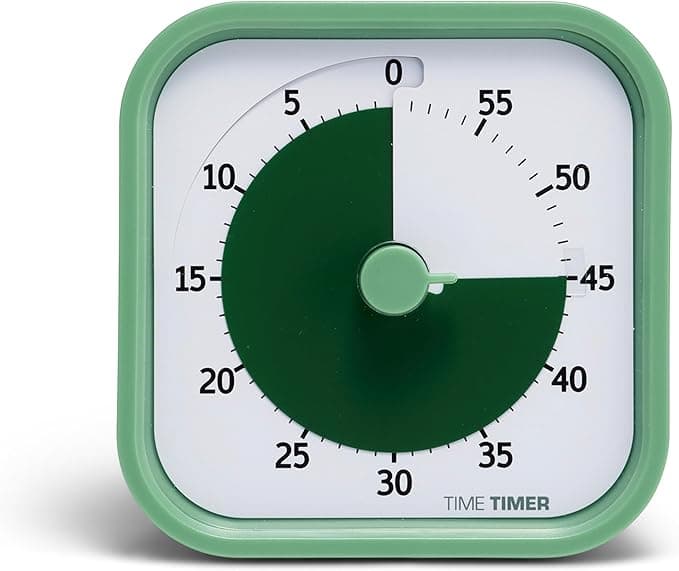
Time Timer Home MOD, 60-Minute Silent Visual Countdown
A visual countdown that shrinks as time runs out, so kids can actually see how much screen time is left without needing to read a clock. The silent operation is a huge plus, no ticking or final alarm to trigger a meltdown, and it takes the "but five more minutes" negotiation off the table because the answer is right there on the wall.
Early elementary (5-8): Kids this age can start participating in the conversation about screens. Let them help decide which shows or games are on the approved list. Teach them to self-regulate by starting with short independent sessions and gradually increasing as they show they can handle transitions. This is also a great age to introduce the concept of "choosing what comes next", when the show is over, they get to pick whether they want to go outside, read, play a game, or do art. Giving them a choice within your boundaries makes them feel empowered rather than controlled.
Older kids (8-12): This is where content quality conversations matter most, because they're starting to navigate the internet and social media pressure from friends. Be honest about why certain content concerns you. Give them increasing autonomy with clear expectations, and check in regularly about what they're watching and playing. This is also the age to start teaching them about algorithm design, how apps are literally engineered to keep them scrolling, and why that awareness matters.
Navigating Screens With a Partner
One thing nobody warns you about is that screen time boundaries only work when both parents are on the same page. If one parent enforces the family media plan and the other hands over the iPad whenever things get inconvenient, the rules lose all their power. Sit down together (without the kids) and agree on the big-picture boundaries. You don't have to agree on every detail, but the core rules, screen-free zones, when screens happen in the routine, content guidelines, need to be consistent.
If you and your partner have genuinely different philosophies about screens, compromise on the non-negotiables and give each other grace on the rest. What matters most is consistency on the things that impact sleep, physical activity, and family connection.
This also applies to grandparents, babysitters, and other caregivers. Be clear about your family's approach without being preachy about it. A simple "we try to keep screens off until after lunch, here are some things the kids enjoy instead" goes a long way. Some caregivers will follow your lead and some won't, and that's a conversation worth having before it becomes a conflict.
When Screen Time Becomes a Problem
Sometimes screen time tips into territory where it's worth paying closer attention. Signs that screens might be causing issues:
- Your child can't stop on their own and melts down consistently when it's time to transition
- They've lost interest in activities they used to enjoy
- Sleep patterns have changed, trouble falling asleep, waking up tired
- Increased irritability, anxiety, or emotional dysregulation after screen use
- They're sneaking screen time or lying about usage
If you're seeing several of these, it's worth pulling back significantly for a period, not as a punishment, but as a reset. We did a full screen detox for two weeks once, and the change in my kids' behavior and creativity was striking. The first three days were rough, lots of "I'm bored" and general crankiness. But by day four, something shifted. They started building elaborate forts, making up games, drawing, and playing together in ways they hadn't in months. After the reset, we reintroduced screens more intentionally and the healthier patterns stuck.
A screen detox doesn't have to be dramatic. Even scaling back to weekends-only for a few weeks can give you and your kids a chance to recalibrate. The point isn't deprivation, it's creating space for all the other good things to come back in.
What About Educational Screen Time?
I get asked this one a lot. "But what about learning apps? What about educational shows? Doesn't that count differently?" Here's my honest take.
Some screen time genuinely is educational. Well-designed apps that teach reading, math, or coding can be valuable tools, especially when used alongside other learning activities. Shows like nature documentaries or high-quality children's programming can spark real curiosity and conversation. I'm not going to pretend there's no difference between a child using Khan Academy Kids and a child doom-scrolling TikTok.
But there are two traps to watch for.
First, the "educational" label gets slapped on a lot of content that is mostly entertainment with a thin educational veneer. An app that claims to teach letters but is really designed around reward loops and in-app purchases isn't education, it's marketing. Be discerning about what actually qualifies.
Second, even genuinely educational screen time still displaces other activities. A child watching a documentary about oceans is learning something, yes. But a child exploring a tide pool, holding a sea star, and smelling the salt air is having a fundamentally different and deeper learning experience. Screens can supplement real-world learning, but they shouldn't replace it.
Our rule: educational screen time still counts as screen time in our family's daily rhythm. It's great when it happens, but it doesn't earn bonus time or exempt itself from our normal boundaries. We do, however, prioritize quality content within whatever screen time we have. If they're going to watch something, I'd rather it be a nature documentary than random YouTube compilations. That curation is part of the family media plan, and it matters.
The Comparison Trap
One more thing: stop comparing your family's screen time to anyone else's. The family that does zero screens isn't better than you. The family that has the TV on all afternoon isn't worse than you. Every family is managing different circumstances, different kids, different seasons of life. The only question that matters is whether screens are serving your family or draining it, and only you can answer that honestly.
Social media makes this comparison trap especially vicious, because you're seeing highlight reels of other families' screen-free adventures while you're in the trenches of your own real, messy life. That mom posting about her tech-free family hike? She probably handed her kid a tablet in the car on the way there. We all do what we need to do. The families who are nailing screen time boundaries are not posting about it, they're just quietly living their lives, imperfectly, like the rest of us.
Find the balance that lets your kids thrive and lets you stay sane. That's the goal. Not perfection. And if today's balance looks different from yesterday's, that's fine. You're not failing, you're adapting. That's what good parents do.